
Sales & client teams
Record every client call and capture the needs, objections and next steps — so your follow-up never misses a detail.
Record or upload a meeting and get a speaker-labelled transcript, a clear summary with decisions and action items, and answers that link back to the exact moment.
How it works
No setup to learn. Capture the conversation and SummaryApp handles the rest.
Record a meeting, lecture, interview or call in the app, or import an audio, video or PDF file you already have.
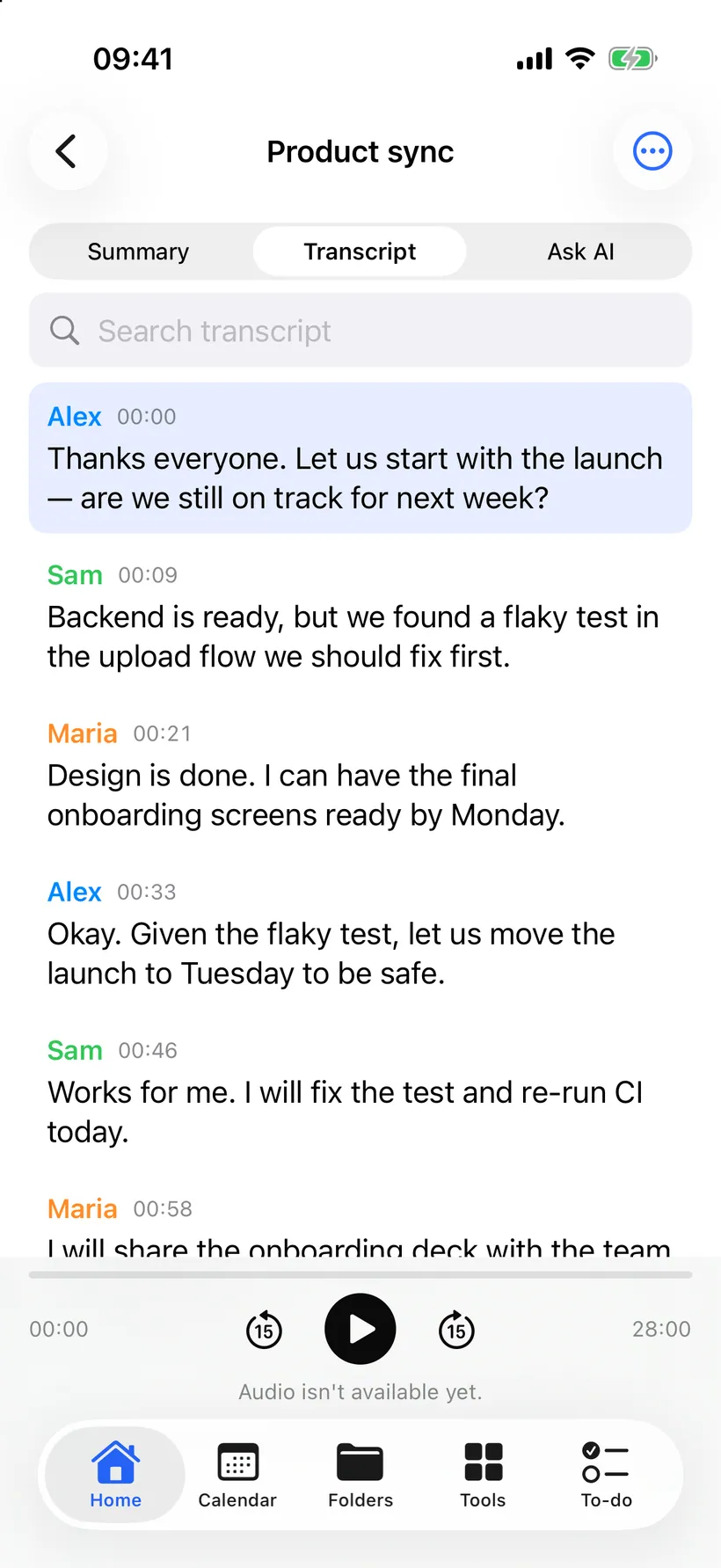
SummaryApp creates an accurate transcript and labels each speaker so the conversation is easy to follow.
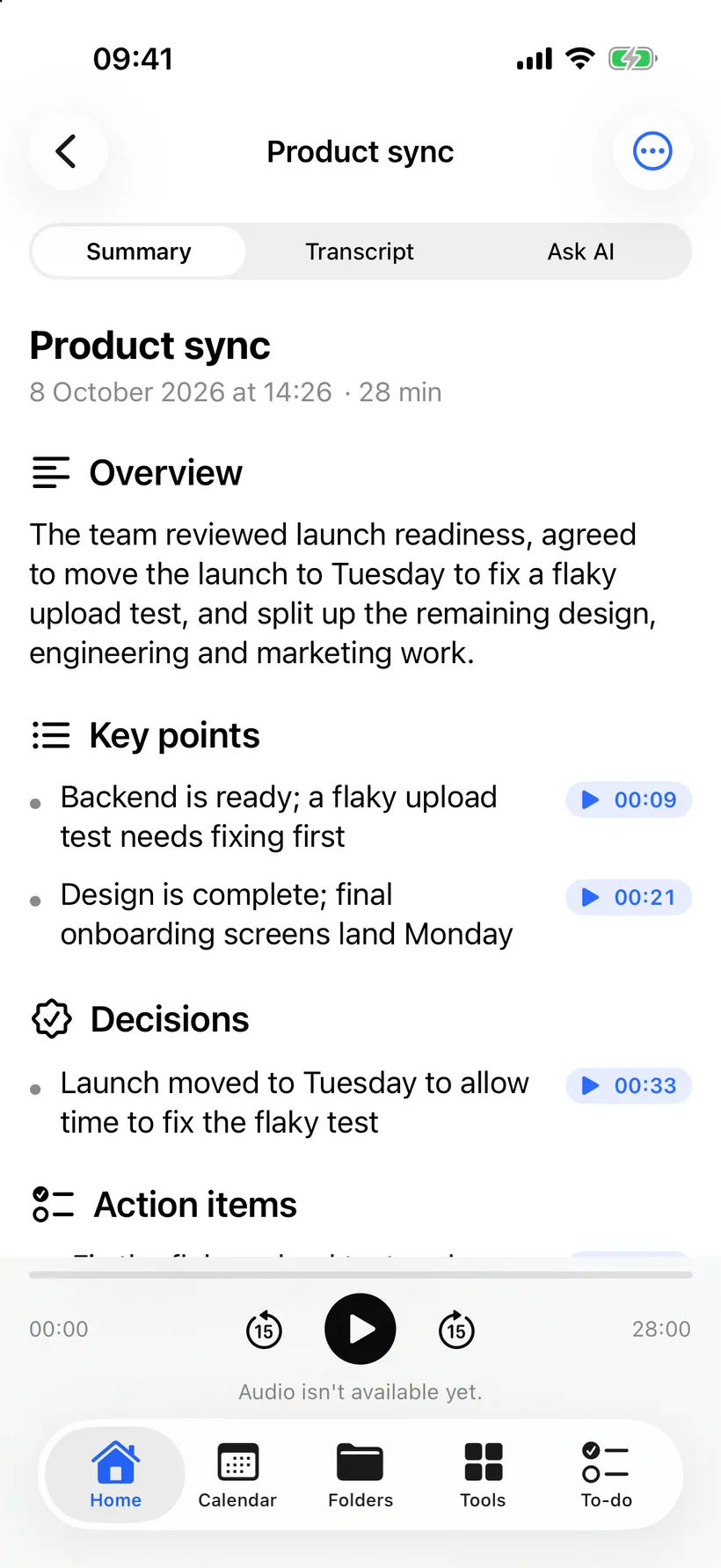
Get a clear summary that captures the decisions made and the action items to follow up on.
Ask questions with answers linked to the moment, turn action items into to-dos, and export to PDF or text.
Features
Everything SummaryApp produces comes straight from your recording — no guesswork, nothing invented.
Each recording becomes a clean, readable transcript with speakers separated so you always know who said what.
A clear summary pulls out the decisions that were made and the action items that came out of the conversation.
Ask a question about any recording and get an answer that links straight back to the timestamp where it was said.
SummaryApp builds a to-do list from the action items in each meeting so nothing agreed gets lost afterwards.
Connect Google Calendar or Microsoft Outlook, and import existing audio, video and PDF files to transcribe.
Export any transcript or summary to PDF or plain text, with everything kept in sync across iOS and the web.
Who it’s for
Wherever the conversation happens, SummaryApp turns it into notes you can trust.
Record every client call and capture the needs, objections and next steps — so your follow-up never misses a detail.

Record lectures and get structured notes with the key points, so you can focus on understanding instead of scribbling.

Capture interviews as accurate, speaker-labelled transcripts you can search, quote and come back to.

Turn recordings into transcripts and summaries to script show notes and pull quotes and clips faster.
A closer look
Real screens from SummaryApp on iOS — the same notes sync to the web.
An accurate transcript with each speaker labelled and a timestamp on every line — search to jump to any moment.
Integrations
Connect your calendar and SummaryApp captures the meetings you choose — across the platforms your team already meets on.
Privacy & security
SummaryApp is built so you stay in control of what you record. Recordings are private to your account and can be deleted at any time, and we are clear about the AI services that help turn audio into notes.
Read our Privacy PolicyYour recordings are private to you and are used only to create your transcripts, summaries and search.
Remove any recording — along with its transcript and summary — from your account whenever you want.
Processing uses trusted services: Deepgram for speech-to-text, Anthropic for summaries, and Voyage for search.
You are responsible for getting consent to record where the law requires it.
Pricing
The Free plan includes 60 minutes of transcription per month. Pro plans add more transcription time and bill weekly, monthly or yearly.
Flexible week-to-week billing.
More transcription time than Free
Billed $9.99 per week, auto-renews until cancelled. Cancel anytime in your account. 3-day free trial, then $9.99/week; cancel before the trial ends to avoid charges.
A simple monthly subscription.
More transcription time than Free
Billed $19.99 per month, auto-renews until cancelled. Cancel anytime in your account. 3-day free trial, then $19.99/month; cancel before the trial ends to avoid charges.
Pay once a year and save.
More transcription time than Free
Billed $99.99 per year, auto-renews until cancelled. Cancel anytime in your account. 3-day free trial, then $99.99/year; cancel before the trial ends to avoid charges.
FAQ
Start on the Free plan — 60 minutes of transcription every month — and upgrade to Pro whenever you need more.